HTML5 Canvas Paint Application: Building Interactive Drawing Tools with JavaScript
An application to draw simple drawings using lines, rectangles and circles in different colours.
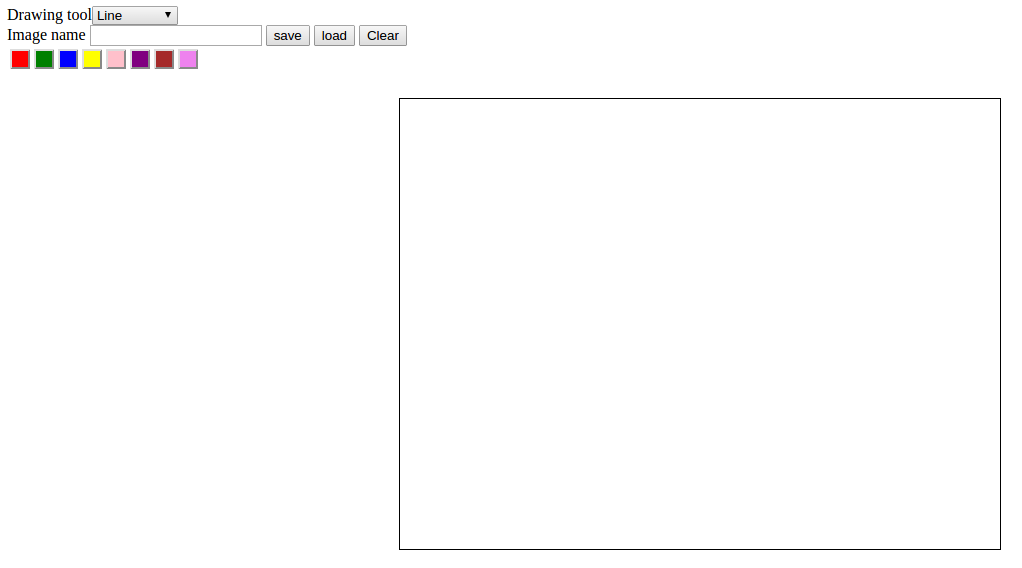
The application is …
By Prabeesh Keezhathra
- 4 minutes read - 715 wordsBuilding web applications that handle dynamic, schema-less data often requires moving beyond traditional relational databases. In this tutorial, we’ll explore how to create a web-based paint application using Python Flask as our backend framework and MongoDB as our data storage solution.
This post demonstrates the practical integration of Flask with MongoDB, showcasing why NoSQL databases are particularly well-suited for applications that handle varied, document-based data like our paint app’s drawing coordinates and metadata.
Traditional relational databases work well for structured data, but a paint application generates dynamic, varied data structures. Each drawing might have different numbers of strokes, colors, and coordinate arrays. MongoDB’s document-oriented approach handles this variability naturally.
Flexibility: No rigid schema requirements - perfect for storing varying drawing data structures
Scalability: Horizontal scaling capabilities for handling multiple concurrent users
Performance: Fast read/write operations for real-time drawing data persistence
JSON-Native: Seamless integration with Flask’s JSON handling and JavaScript frontend
MongoDB is an open-source, document-oriented database designed for ease of development and scaling. You can install MongoDB locally by following the instructions from the official MongoDB installation guide.
Once installed, start the MongoDB service and connect using the mongo shell to familiarize yourself with basic operations.
Here are the core MongoDB operations you’ll use while developing the paint application:
 1# Show current database
 2db
 3
 4# List all databases
 5show dbs
 6
 7# Switch to or create a new database
 8use paintapp
 9
10# Get help for mongo shell operations
11help
 1# Insert a new drawing document
 2db.drawings.insert({
 3    "strokes": [{"x": 100, "y": 200, "color": "#ff0000"}],
 4    "timestamp": new Date(),
 5    "user": "artist1"
 6})
 7
 8# Show all collections in current database
 9show collections
10
11# Find all drawings
12db.drawings.find()
13
14# Find specific drawings with query
15db.drawings.find({"user": "artist1"})
16
17# Update a drawing
18db.drawings.update(
19    {"_id": ObjectId("...")},
20    {"$push": {"strokes": {"x": 150, "y": 250, "color": "#00ff00"}}}
21)
22
23# Remove a drawing
24db.drawings.remove({"_id": ObjectId("...")})
Pro Tip: MongoDB’s cursor displays only the first 20 documents by default. Use it command to iterate through additional results when working with larger datasets.
The paint application follows a clean separation between the frontend Canvas API for drawing interactions and the Flask backend for data persistence. Here’s how the components work together:
The application demonstrates several important patterns for Flask-MongoDB integration:
This paint app architecture serves as a foundation for more complex applications:
The complete source code for this Flask-MongoDB paint application is available on GitHub. The repository includes:
Once you have the basic paint app running, consider these enhancements:
This tutorial demonstrates how NoSQL databases like MongoDB can simplify web application development when working with dynamic, document-based data. The flexible schema and powerful query capabilities make MongoDB an excellent choice for modern web applications that need to handle varied data structures efficiently.
For more Flask and database integration tutorials, check out our related posts on Python web development techniques and modern web application architectures.
An application to draw simple drawings using lines, rectangles and circles in different colours.
The application is …